Software for Personal Injury Lawyers: What Tools Do You Need?

The right software can make running your personal injury law firm easier.

Software tools can lead to increased productivity for lawyers and their teams. They can help you provide a consistent experience for clients. Personal injury law software can even help you make parts of the client acquisition process a breeze.

There are several different categories of software personal injury lawyers can benefit from. Below you’ll find our guide to the major types of tools for lawyers you may want to consider.

Client Intake Software
Client intake software logos

Client intake software helps record important information from potential clients. Onboarding new clients is fast and simple with client intake programs.

The client intake process is a potential client’s first introduction to your law firm’s organizational and communication skills, so it’s crucial. Nearly 80% of law firms say that intake software helps them get more clients while using time efficiently.

These tools let you gather important data, schedule consultations, and sign documents all from one place. This results in eliminating staff time spent manually entering this data into other systems.

Some of the most popular lawyer client intake software programs are:

  • CloudLex
  • Captorra
  • Clio
  • Lawmatics
  • Interaction

Intake software is helpful if you struggle to keep up with the administrative aspect of communicating with new prospective clients.

Case Management Software

Case management software logos

Once someone becomes a client, you may need a tool to track their case and make important updates.

With case management tools, you can see where a case falls in the process from intake to completion. You can also safely share information like case matter with clients right inside the platform.

Some of the best tools on the market for personal injury case management software include:

  • Practice Panther
  • CaseFleet
  • MyCase
  • GrowPath
  • Lawcus

For personal injury lawyers, who may be discussing personal details such as someone’s medical conditions and care, it’s best to find a tool with top-level security.

Document Management Software
document management software logos

Any legal case, but especially personal injury claims, involves a lot of documents shared back and forth.

As the name implies, document management software can store these important materials for you. More importantly, it does so in a way that ensures you can easily search for and update your documents.

Popular document management tools for lawyers include:

  • Clio
  • SharePoint
  • NetDocuments
  • LexWorkplace

Document management is a feature that might come with case management or practice management software plans. Check that you’re not already using something to cover document management before investing in something separate.

Most document management programs are for storage purposes, which makes them distinct from document automation tools. The latter focuses on helping personal injury attorneys draft common legal documents more quickly.

Practice Management Software

practice management software logos

For something holistic that enables you to run multiple aspects of your firm, practice management software covers a lot of bases.

If you don’t want a lot of subscriptions to different tools, look for an option that includes most of what you need as features. Practice management tools often cover the administrative, accounting, case management, and client communication activities you need to manage your law firm.

The most popular practice management tools on the market for lawyers are:

  • SmartAdvocate
  • FileVine
  • Clio
  • PracticePanther

Project Management Software
project management software logos

If you have the right practice management tool, you might not need another one for project management. There is a lot of overlap between the two. If possible, choose the one that is most appropriate for your law firm, as using both may be redundant.

Project management tools help you create reports, schedule things, track tasks across your entire team, and send out invoices.

The most commonly-used project management tools for lawyers are:

  • ClickUp
  • Trello
  • Monday
  • Clio
  • Smartsheet

Customer Relationship Managers (CRMs)

CRM software logos

When you get a new lead, you may need to track that person through multiple follow-ups and actions before they become a client. A customer relationship manager can help with that.

A customer relationship manager maintains contact details about each potential client.

When someone reaches out to you, such as through a contact form on your website, they’re added to the tool automatically. This can help you better understand how your law firm marketing efforts are paying off.

From there, you can see exactly where that contact is in the sales pipeline. Using that information, you can see important data about your potential clients, such as when they’re most likely to take action to work with you.

For example, you might learn that your average car accident client hires you after three personal emails sharing relevant details about their case type with them.

Some of the best CRMs for personal injury lawyers are:

  • LawMatics
  • HubSpot
  • Intapp
  • Captorra
  • Interaction

CRMs are easy to confuse with client intake tools. They actually serve two different purposes. Client intake software helps you bring people on board once they’ve hired you. A CRM is primarily used to communicate with people who are not yet clients or may never become clients (like referral partners).

Timekeeping Tools

Time tracking software logos

If you still use the billable hour, you need timekeeping tools to accurately track what you did for each client. Timekeeping tools can help with this and much more.

These tools give you a sense of how long it takes you to do various projects, such as drafting, research, and communication with clients. You can even track non-billable time to spot inefficiencies.

Timekeeping may come as a feature in an existing software tool for your law firm. If not, it’s smart to choose a standalone one for you and your team. The most common options for personal injury lawyers are:

  • Toggl
  • Microsoft ToDo
  • TimeSolv
  • Everhour

Legal Research Tools

legal research software logos

Looking up case law, statutes, or other data from courts is crucial for any lawyer. Finding this information, storing it, and getting notified about updates will help you serve clients more efficiently.

Here, the choice is between free and paid options for legal research. Paid tools may come with bigger databases, more frequently updated databases, or other features that make your life easier.

Some of the best legal research tools include:

  • Caselaw Access Project (free)
  • CourtListener (Free)
  • Legal Information Institute (Free)
  • FastCase (Paid)
  • LexisNexis (Paid)

Other Useful Tools for Personal Injury Lawyers

What’s listed above are the most common tool categories for all personal injury lawyers. There are plenty of other types of tools that are more niche. Depending on your practice, you might also need additional tools for lawyers like:

Tips For Choosing the Right Software for Your Personal Injury Firm

There are two big considerations to think about when investing in new software:

First is whether the new software is worth the cost. This includes considering the actual price tag for the tools as well as the opportunity cost. Will the additional training time and expenses pay off in a meaningful way for you or your clients?

The second is to think about the features that you need out of the tool and the features you already have in your existing tech toolset.

Your law firm tech stack should all work together to streamline operations rather than make things cluttered or confusing for you, your staff, or your clients. Look for integrations with existing programs before signing up for anything new.

Some tools have significant overlap when it comes to features. You don’t necessarily need to select a different tool for each of the categories below. For example, you may not need separate client intake, case management, and timekeeping software if you have one tool that handles all three.

Get More Time Back with Personal Injury Law Firm Software

As a personal injury lawyer, your time is best spent serving your clients. The right software can clear the path so you can spend more time focusing on providing legal services.

You can also get more of your time back by delegating time-consuming and yet important aspects of your practice, such as law firm marketing. Keep your client pipeline full by developing and executing a strong law firm marketing plan with the help of an outside marketing partner like Rankings.io.

The post Software for Personal Injury Lawyers: What Tools Do You Need? appeared first on Rankings.

Best Document Management Software for Law Firms in 2023

Document management is a fact of life for lawyers. There’s seemingly no end to updating and storing materials associated with legal matters.

Having a clear system for document management could help with that. It could also decrease the possibility of errors and make it easier to find what you need when you need it.

Only one-third of lawyers use document assembly software. Of those who use it, 94% said it was extremely important for the operation of their law firm.

Unnecessary time spent creating documents or changing them keeps you from growing your law firm and helping more clients.

Investing in document management practices can help you grow your law firm by streamlining the way you work.

Document management as a practice is important to law firm operations. Having standalone document management software may not be. Depending on what systems you already use, you may already have document management covered. 

There are several different document management options available to lawyers. Choosing the right one comes down to the features you need and the tools you’re already using.

Clio

Clio logo

Over 150,000 people in the legal industry use Clio for both document management and practice management software.

For law firms looking to get a lot out of one single tool, Clio is a good bet. With over 200 integrations available, there’s a lot of room to customize things for your law firm. These integrations include Zapier, Google Drive, Dropbox, and QuickBooks.

The best features of Clio include: 

  • Unlimited document storage with auto-backup to the cloud
  • Document searchability 
  • Document templates
  • e-signature capabilities

Because it’s in the cloud, you can access documents from anywhere. Clio also has comment threads for every file and a complete version history so you can track all changes.

Clio does come with some cons. Some users note that it’s clunky to use or that it feels like too much for a law firm.

NetDocuments

netdocuments logo

With NetDocuments, you can easily find and look at your documents anywhere, including on your mobile phone. Share documents with the click of a button to make things simple for clients or staff members.

This tool integrates with Clio, DocuSign, ActionStep, PracticeLeague, and Legal Sense. Their pricing is custom and requires setting up a session with their team.

The biggest benefits of NetDocuments are their security, integration capabilities, and version management. The drawbacks are that it may be too complex or costly for solo lawyers, and it doesn’t run on Macs.

Note: NetDocuments recently acquired Worldox, another population law firm document management tool.

Microsoft SharePoint

SharePoint logo

Microsoft SharePoint is very convenient for law firms. Certain Office 365 plans include SharePoint, so you might already have access to it.

Because it’s a Microsoft application, it works well alongside Outlook email and Outlook calendar. 

SharePoint is compatible across operating systems, so Mac users won’t have a problem. It’s also reasonably priced at $5/user/month. 

Its biggest benefits are that you can create libraries and lists quickly. You can also set it up for use as an intranet system.

If you decide to opt for using it as an intranet, you might need to hire an expert to set it up for your firm. If you plan to use it for simple document storage, you may not need an expert to help you. 

Smokeball

SMOKEBALL logo

Smokeball is both an online and desktop-based tool to help you keep track of law firm documents.

The biggest pro of using Smokeball is that you can easily create custom templates of your most frequently used files. The tool will automatically pull in certain information, like contact info. With unlimited backup storage, you’ll never worry that you’ll lose things.

Smokeball integrates with LawPay, QuickBooks, InfoTrack, LawToolBox, and Smith.ai.

On the downside, however, Smokeball is not fully cloud-based. This means you don’t get the full benefits provided by other cloud-based systems, and you need a strong Windows computer. Mac systems are not supported by Smokeball.

Some users have complained online about how hard it can be to find and edit documents with this tool, too.

Document management only comes with the mid-tier version of Smokeball, which starts at $99/month.

LexWorkplace

LexWorkplace logo

Built specifically for the legal industry, LexWorkplace has solid features for both email management and document management. Their security is top-notch. It’s also easy to search and tag documents, too.

This tool integrates with Clio, OneDrive, Adobe, Microsoft 365, and iManage.

This tool is popular because you don’t need an outside consultant to set it up to your liking. It also works on Mac and PC.

One of the biggest cons of LexWorkplace is the cost. For just three users, a law can expect to pay at least $395/month.

ProLaw

PROLAW logo

ProLaw is not strictly document management software. It’s primarily a practice management tool. You can choose to add document management, but many users don’t feel it’s as good as other standalone document management tools.

If you’re already using ProLaw or need practice management and document management, this might be a good choice for you.

This tool integrates with Microsoft Outlook/Office and Proforma.

A big downside of this option is that it’s not cloud-based. As an on-premise software, you’ll need your own private cloud or server to run it.

ProLaw’s exact pricing isn’t published, but it comes with a hefty starting price point of $30,000 for teams of 15 or fewer litigators.

Rubex by eFileCabinet

rubex logo

eFileCabinet is not made specifically for the legal industry. It also serves insurance companies, accounting agencies, and HR departments at other companies. That doesn’t mean it can’t work for lawyers, though.

It’s built more for business workflow automations, but it does have a document management component. The tool comes with end-to-end document automation, workflow, and management components. Rubex by eFileCabinet comes with substantial storage space. The interface works well with staff members since it looks like an email inbox.

Rubex by eFileCabinet integrates with DocuSign, Microsoft Office, Salesforce, and Active Directory.

A negative aspect of this tool is that it doesn’t come with some of the features you’ll find in other document management tools for law firms. For example, it lacks the ability to assign things to specific matters and cases.

Further, limited templates are available in beginner and middle-tier pricing plans. The basic plan starts at $695 per user per year.

Features to Look for in Document Management Software

Before purchasing a standalone document management tool, it’s important to know the key features to look for. It’s also important to think about how it may fill a gap in your existing tech stack. That can ensure you’re not paying for unnecessary software.

Your first choice is between cloud-based or on-premise software. Cloud-based document managers grant you access from anywhere. They also have constant backup and sync features. On-premise software may require its own server, and you can’t access it on the go.

At a base level, the must-haves for a document management tool for law firms include:

  • Document and file storage
  • Integrations with existing tools, such as Microsoft Office or case management tools
  • Document version management
  • Ability to favorite or search recent documents
  • Compatibility with your operating system
  • Full-text search
  • Permissions
  • Matter notes

Plenty of document management tools come with other advanced features. These may be helpful depending on the context of your practice. If you already have these features covered with other tools, you may not need to invest in document management programs with this additional functionality.

These advanced features include:

  • Email management
  • Document profiling/metadata
  • Unique document IDs
  • Document check-out and check-in
  • Practice management integration
  • Geographic data redundancy
  • Multi-factor authentication
  • End-to-end data encryption

Those last two factors are important for security best practices.

Evaluating Document Management Software

There are a few other considerations to take into account besides the features. Of course, pricing comes into the mix. You’ll also need to consider your firm’s specific needs and priorities. Some features may be more valuable to you than others.

Another key consideration is how well the new software integrates with your existing law firm tools.

You don’t need to pay for multiple software options that accomplish the same goals. Before buying a new document management tool, check that none of your existing case management, document automation, or practice management tools cover your document management needs.

For example, if you use Clio, you might already have all the document management functionality you need. 

Finally, aim to strike a balance between document management software and usability. These tools should make things easier for you and other staff members. To do so, consider any learning curve involved in getting up to speed with a new tool.

When to Use Document Management Software

Any firm can benefit from digital document management. Whether you need a standalone tool is the question to ask yourself.

If you already have a tool in place that has built-in document management, you may not need a standalone tool. If your toolset doesn’t already include this feature, then you may want a dedicated document management system.

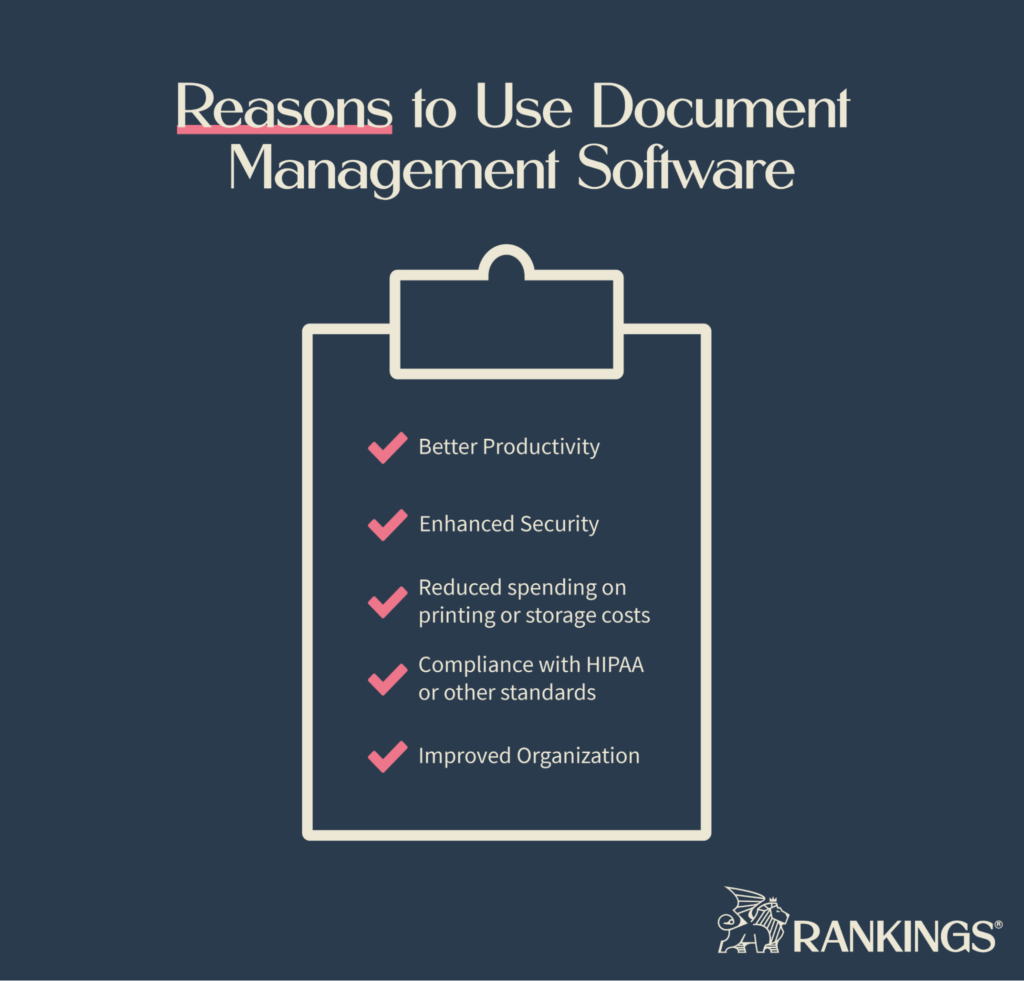
Reasons to Use Document Management Soffware

Whether you need a standalone document manager or you’re covered by existing software, the use case is the same. Law firms should use document management tools for:

  • Better productivity
  • Enhanced security
  • Reduced spending on printing or storage costs
  • Compliance with HIPAA or other standards
  • Improved organization

While it might take some time to get things loaded into your document management and to teach everyone on your staff how to use it, this can pay off in spades over the long run.

Choose Your Document Management Tool Now

If you find that you need a standalone document management tool, consider your current software programs first. Consider how well they will integrate together. Incorporating any other tools should be a value add.

Document management is just one piece of your law firm tech stack. Adding tools is also a great way to improve your productivity as a lawyer. To reach further effectiveness, you may need to add other tools to the mix, such as case management software or practice management software.

The post Best Document Management Software for Law Firms in 2023 appeared first on Rankings.

8 Tips for Effective Blog Writing for Lawyers

Over 70% of people would rather get information from blogs than through traditional advertising. That means blog posting is necessary for law firms that want to grow their business through organic traffic from Google.

When written well and with the right law firm marketing strategy, your blog can help you grow your law firm.

Through your blog, you can answer common questions from your target clients, address how you approach legal problems, and showcase your knowledge. But many lawyers are unaware of the most important things to consider when writing a blog post.

By following the tips below, you can get more out of your writing and set yourself up for an increase in new cases.

1. Identify Topics of Value to Your Target Audience

The process of writing a blog starts well before putting words on the page. A great law firm blog takes keyword research and planning to get the best results.

Many lawyers make the stake of writing topics at random and hoping that something meets their audience’s needs. Planning ahead helps you find the topics your ideal clients actually care about. It increases the likelihood that they will find your content online.

You may already have some ideas of the topics your clients care about. That’s a great place to start brainstorming ideas for topics. After considering your clients’ most common questions and problems, you’re ready to get into keyword research.

When you do keyword research, you’ll find all the different ways that people search for the services you offer. You’ll find the common questions you hear all the time.

These keywords map directly to topics you might want to add to your content plan and inform your content strategy.

But you’ll also find the topics you didn’t even know your prospective clients cared about.

These make excellent topics for articles that address unique needs. They also allow you to share your insights and build trust with underserved audience members.

2. Balance Your Audience’s Needs with SEO

When you write on the web, you’re really writing for two audiences. First are the people that your law firm serves. Second is the search engine that helps these potential clients find your content.

To get the best results from your blog, you’ll need to balance the law firm SEO tactics with your target audience’s needs. Great blog posts are created for people while keeping search engines in mind.

Before you begin writing an article, look at the pages that rank on Google for that topic.

Doing so will give you an idea of what people are looking for when they perform that search. It helps you determine the “search intent” for the topic. It will also show you the types of content that Google tends to rank for the topic.

This information is critical.

It helps you decide what your title or headline needs to be. It helps you choose the format for your article (e.g., whether it’s a guide, a list, or something else). Finally, it can help you figure out what content should be in the post.

As you write an article, consider both how you’ll connect with the reader and how search engines will try to understand the content.

Here are some of the best ways to write for reader connection:

  • Write in a clear, concise, and engaging style
  • Use language that is accessible to non-lawyers
  • Eliminate jargon and terms of art, and define them if they must be used
  • Avoid long paragraphs
  • Use formatting elements like bulleted lists to break up text into scannable sections

At the same time, draft with the search engine in mind, too, by doing things like:

  • Using relevant keywords
  • Selecting internal links to other pages on your website with additional content
  • Reference high-quality sources with external links

One thing that helps both readers and search engines is using subheaders to break up content. This makes the post more digestible and also highlights the major concepts of the piece.

By combining aspects of writing for people and for search engines, your blog is positioned for better performance than posts that focus on one over the other.

3. Write with Authority

As a lawyer, your expertise matters to your clients. Your blog is an outlet to demonstrate expertise to both readers and search engines.

Take the time to write credible, accurate, and valuable content. Drafting informative and authoritative blog posts shows your clients your familiarity with the law. By helping them find answers to their questions, you also demonstrate the value of working with you.

Writing with authority isn’t just important for connecting with readers. Google cares about expertise, authority, and trustworthiness (or EAT) in the content that it indexes.

It uses these metrics to decide which content to trust over others, so each piece you create should be infused with all three.

In addition to speaking from experience in your blog, you’ll also want to cite sources. Back up any claims you make with evidence to show you’ve done your research and take your blog seriously.

Many lawyers struggle with balancing authority and simplicity. It’s easy to fall into the trap of writing “expert-level” content by stuffing in formal language and jargon.

Writing over someone’s head to show your level of knowledge will backfire. It can make clients feel like you’re condescending or that you won’t be able to communicate well with them. Write in an accessible way in each post.

4. Create Engaging Headlines

You only have a few seconds to get someone’s attention. One way to grab that attention is with enticing headlines for each blog post.

But doing so requires a balance between SEO best practices and understanding your audience.

The best headlines don’t just use titles that pique someone’s interest. They also use relevant keywords to help search engines understand what the content is about.

No one wants to read Statutory Negligence Concerns for Comparative Fault in Georgia. It might be a little too dry of a title for your audience. The same reader may want to know the answer to What Are Georgia’s Accident Fault Rules?

Both articles might cover the same information, but one has a better headline. At the same time, the second one uses keywords that your target audience actually uses to find the information they need.

Using power words and emotional triggers in your titles can create a sense of urgency or interest. These can be helpful in crafting a title but always come second to search intent.

Here are some headline styles that generate interest:

  • X Mistakes to Avoid with ___
  • X Reasons Why You Must ___ in Your ___ Lawsuit
  • How to ___ While ___
  • What You Don’t Know About ___ Could Hurt You

The goal is to accurately portray the information in your blog post while getting someone interested in reading beyond the headline.

5. Write for Scannability

The way that people read content on the web is different from the way they may read a book or magazine.

When people search for answers to their questions on Google, they want that answer as soon as possible.

As a result, they’ll open a few relevant results for their question and scan through each to see if they can find their answer. The fact is, most people don’t read online content one word at a time.

Instead, they scan to see if it’s relevant to them. If not, they hit the back button and leave your site entirely.

Writing for the online reader may be different from any kind of writing you’ve done before. If you want to capture their attention, your top priority should be answering their questions as directly as you can.

Beyond that, there are some readability tricks you can use to make your content scannable.

Use short paragraphs, bullet points, and headings that direct their attention to what is most valuable for that reader. Long walls of text are difficult to read for anyone and may also be intimidating.

6. Repurpose Your Blog Posts for Multiple Channels

Law firm content marketing is about more than just blog posts. If you put in the work to create a solid blog post, you probably also want to get as much traction out of it as possible.

You can get more mileage out of your blog content by repurposing the ideas for other attorney marketing channels.

The ideas that you cover in your blog are a great jumping-off point for social media marketing content or video marketing for lawyers. If your law firm has an email newsletter, you might even repurpose your content for those readers.

7. Measure Your Success and Optimize

If you’re investing your time and effort into blogging, you’ll want to make sure that effort’s paying off.

It’s well worth setting goals for your blog at the outset. Once you’ve published content for a while, you can revisit your goals and compare them to your blog’s actual performance.

Many analytics tools are available to track your blog’s performance and engagement. These tools can provide a lot of detail on performance but are often highly specialized. Most lawyers choose to outsource tracking to an SEO professional.

One of the best parts about writing a blog is that nothing is set in stone. Your blog is a living thing, unlike printed material.

If a certain blog post isn’t performing the way it should, you can always return to optimize it. On-page optimization can help you improve your rankings, drive increased traffic, and net you more new clients.

With the right data analytics tools in place, it’s easy to see where you have the most opportunity to improve older posts.

8. Consider Outsourcing the Blog Writing Process

Quote grom Gabriel Levin

Even if you have the time to write and publish consistently, there’s a good chance it’s not the best use of your time.

Writing for the web is highly specialized. Just like writing a motion or legal brief, blogs have their own unique nuances. It may be unlike any kind of writing you’ve done before. Most lawyers are better off focusing on their firm rather than trying to figure out the rules of blog content creation.

It’s true that blogging is valuable for generating traffic to your law firm website. It’s also time-consuming to stay on top of writing new posts or optimizing old ones while still making time for your clients.

Partnering with a professional can prevent you from losing that valuable time. A professional law firm marketer can take over this aspect of reaching your audience for you by handling things such as:

  • Planning out your content
  • Regularly publishing high-quality content that aligns with your attorney marketing plan
  • Promoting your blog
  • Repurposing your blog content for other channels
  • Measuring your blog’s performance and engagement
  • Optimizing your content for continued results

Working with dedicated, outside professionals can help attorneys reach new levels of productivity. When you outsource content marketing, your to-do list becomes more focused on helping clients, not taking on routine marketing tasks.

Invest in Content Marketing Now

If you know you want your website to do more for you, finding the right person to help you with blogging is your next step.

The team at Rankings.io knows what it takes to get a law firm ranking for ideal keywords. Contact us today to learn more about how we can help you implement an effective content marketing plan.

The post 8 Tips for Effective Blog Writing for Lawyers appeared first on Rankings.

Top 8 Law Firm Reputation Management Tools

Across all industries, 90% of local consumers base their decision on what other people have to say. Getting reviews from previous clients is powerful for your law firm marketing engine.

Reviews from former clients tell a story about what you’re like to work with. By painting a picture for potential clients, reviews can help convert someone who needs to hire an attorney.

But if your law firm receives numerous reviews, it can be hard to stay on top of what people have submitted.

Reputation management tools like the ones below could help you with this. By managing your online reviews, you could look more attractive to potential clients.

How Can a Reputation Management Tool Help Your Law Firm?

When clients see multiple five-star reviews on your website or online profiles, it signals trust and credibility. People tend to trust the experiences of others just like them. Potential clients seek out reviews to understand what it may be like working with you. 

Reviews are valuable for local SEO. Besides sending positive signals to prospective clients, they are an important ranking factor.

Reviews on your Google Business Profile (formerly Google My Business) can help you up in local searches.

Google’s algorithm takes both the review count and rating into account when ranking businesses. These factors determine your “prominence” and likelihood of showing up in search results. Complete and accurate data across your local business listings are important, too.

If you get a lot of reviews across many platforms, a reputation management tool can help you stay on top of them.

By consolidating reviews into one reputation management tool, they become easier to manage. You’ll be able to see them all and respond to your reviews across multiple platforms. And they often help with automating your review requests.

One quick note, though. If you use automated review requests, they should follow any bar association rules. Verify that you’re also following any rules from the review platform, too. Certain review sites are less comfortable with businesses soliciting reviews.

Finally, reputation management tools may get confused with social listening tools. They’re similar but not the same thing.

Social listening tools help you hear what people are saying about your brand on social media platforms. Reputation management tools track places like Google Business or Yelp to tell you when someone posts a new review.

Most law firms don’t need a reputation management tool. If your law firm receives numerous reviews and you find tracking them overwhelming, one of these tools may be appropriate.

1. Birdeye

Birdeye takes a lot of the work out of requesting reviews. It also lets you know as soon as you’ve received a new review online. Using Birdeye, you can ask for and share reviews across over 200 sites.

You can even integrate it with your website. This feature lets your most recent reviews immediately show up in scrolling banners. By doing so, you showcase real-time feedback and social proof from clients.

One of the best aspects of using Birdeye is that they make it easy for your clients to leave reviews at their convenience. Automatic follow-ups increase the chances that past clients will take the time to write out their thoughts.

2. Podium

Housing all your primary review data in one place might make things much easier for you. With Podium, you get a dashboard that lets you:

  • Easily track invites you sent to clients to give you reviews
  • Manage your reputation on multiple websites
  • Respond quickly to clients.

This combination signals an active law firm that’s engaged with its clients. You can also send out review requests via text message through this platform.

3. ReviewTrackers

Compared to some other options listed here, Reviewtrackers is more for review collection. This tool gathers all of your client’s feedback so you can better understand their needs. It can show you which feedback shows up most frequently and which may be helpful for fixing processes behind the scenes.

You can also learn more about what your clients enjoy the best. This makes it easy to translate feedback into consistent law firm marketing messages.

Being able to see the good and the bad quickly gives you options to fix problem areas or play up positive aspects.

4. SiteJabber

Every positive comment from a past client can be showcased as broadly as possible, helping you get the most mileage from it.

SiteJabber republishes your reviews on other feedback sites like the BBB. You get the benefit of your clients’ positive experiences across the web. You can then leverage their comments on your website, review platforms, and Google.

5. ReviewPush

Much like other review management tools on this list, ReviewPush puts your reviews in one place.

With it, you can monitor multiple sites and unlimited locations. This feature is most helpful for bigger law firms with a multi-state presence.

You can also see how your scores stack up against one another for different locations. You’ll also get an email every time you have a new review. You can even respond to the review directly from your email.

6. Reputology

This reputation management tool simplifies the ability to see, answer, and analyze your online law firm reviews.

Reputology is very specific to local markets. You’ll get an email any time there’s a new review about your firm. You can then use their platform to reply to that client’s feedback.

7. Brand24

Many brands outside the legal industry use Brand24 to watch their reputation online. If you work with a major law firm with multiple law offices across several states, this tool can organize all your different online mentions.

Brand24 looks at social media, but it also crawls the web. This allows it to collect any mention of you or your lawyers on websites, blogs, news sources, and Google reviews.

8. StatusBrew

StatusBrew is primarily a social media listening tool, but that doesn’t mean it can’t help you. There are some reputation management options inside.

If your law firm gets mentioned a lot on social media, it might be worth exploring this option. For example, StatusBrew helps you manage reviews on Facebook and Google Business.

If that’s where you get most of your feedback, this may be a nice all-in-one tool for you.

Develop Better Ways of Getting and Responding to Reviews

The sooner you set up systems to build on referrals and word of mouth, the better. Getting in the habit of asking clients to leave you reviews can help your local online presence.

Making it simple for clients and automating the process with reputation management tools can assist with this. Doing so can increase the chances they’ll take the valuable extra step of leaving you a review.

There’s good and bad news about digital marketing for law firms: you have access to more tools and things to track than ever.

When used properly, these tools are a great way to build your law firm’s online presence. But many lawyers find it overwhelming to manage local business listings, social media, local SEO, reputation management, and public relations.

Handing things off to a knowledgeable marketing partner ensures you’ve covered all the bases. If you want to grow your reputation and level up your law firm marketing, contact Rankings.io today.

The post Top 8 Law Firm Reputation Management Tools appeared first on Rankings.

10 Best Time Tracking Software for Lawyers in 2023

Lawyers have to track their time for purposes of billable hours. It is also valuable to see where non-billable time is spent, too. This helps you reduce distracting or non-productive activities and refocuses the entire team on the most valuable tasks.

Finding the right timekeeping software for your firm can improve your ability to track billable hours. Here are some of the best options for tracking your time.

1. Toggl

Toggl makes time tracking easy. You can set different colors for various kinds of activities and name your projects. You can add as much or as little detail as you want for each action, and the service comes with a mobile app, too.

You can also view reports for any time period you’d like. This makes billing simple when you need to invoice a client for your time.

Toggl’s timer runs in the background, which can be helpful so long as you remember to start and stop it.

Key Features

  • Track your time on the mobile version or web application
  • Color-coding for tasks and projects
  • End-of-week reports
  • A free plan with unlimited time tracking and projects

Pricing

  • Free plan
  • Starter plan: $10/month, includes billable time and hours rounding
  • Premium plan: $20/month with team tracking reminders and fixed fee projects
  • Enterprise: Contact for pricing; unlimited workspaces available

Pros and Cons

Pros

  • Very easy to use
  • Law firms can get a lot out of the free plan
  • Quickly grab reports at the end of the week for billing purposes

Cons

  • Individual projects or clients must be created manually
  • Must press the “start” button and tag tasks manually
  • Easy to forget that the timer is running

2. MyHours

MyHours is another option built for people who work on an hourly basis rather than on flat-fee projects. It’s also good for bringing a team together to work on projects and tasks with timesheets.

Key Features

  • Track time easily across individual or team projects
  • Analytics and reporting show snapshots of time spent
  • Good reporting features

Pricing

  • Free: for individuals and small teams with unlimited projects or team members
  • Paid: starts at $7/month per user with priority support, invoices, and log editing

Pros and Cons

Pros

  • Offers a 30-day trial
  • Solo or small law firms can get a lot out of the free version
  • Run reports quickly on invoicing days
  • Good customer support

Cons

  • Few integrations with other tools
  • No ability to automate daily reminders for team member billing
  • Limited mobile app

3. Microsoft To-Do

If you want to combine task tracking and hourly billing without investing in an entire project management tool for your law firm, Microsoft To-Do may be a good fit. Typically, most law firms need something more robust for project management, but a solo lawyer just getting started might see some benefit to the simple task listing available here.

Key Features

  • Keep track of customer contact details
  • Task/project management
  • Calendar sync
  • Repeating tasks
  • Simple time billing

Pricing

  • Free plan: one user only
  • Business plan: $9/user per month
  • Max price: $99/month

Pros and Cons

Pros

  • 14-day free trial
  • Lots of integrations with third-party tools
  • Solid mobile app

Cons

  • Limited storage options
  • Many users report bugs and crashes
  • Many users say that checklists aren’t as functional as they could be

4. Everhour

Everhour is popular in multiple industries. Its powerful integrations allow you to easily budget, run payroll, and gather data for client invoicing.

You can also split billable and non-billable hours, capturing everything you work on. This allows you to keep client work separate from things like operations tasks.

Key Features

  • Payroll management
  • Budgeting capability
  • Multiple billing rates
  • Accounting integrations

Pricing

  • Free tier for teams of up to 5
  • Lite plan starts a $5/user/month for reminders, clients, billable rates, profit, invoicing, and API access
  • Team plan at $8/user/month for time cards, expenses, and scheduling

Pros and Cons

Pros

  • Perfect for managing projects at different billable rates
  • Features for estimating time on projects
  • Collaboration tools for the entire team
  • Very easy to use

Cons

  • Reports for new clients must be created manually
  • Not all daily or weekly reports can be customized

5. TimeSolv

TimeSolv goes one step beyond time tracking, helping with things like invoicing and staff monitoring. It also has a lot of integrations with legal tech tools you might already use, like LawPay, Office 365, or QuickBooks.

This is one of the higher-priced tools, and some of the features, like project and document management, may be redundant. 

Key Features

  • Invoicing
  • Payments
  • Document management
  • Reporting
  • Budgeting
  • Time tracking
  • Project management

Pricing

  • 1-4 users: $39.95/user/month
  • 5-14 users: $34.95/user/month
  • Over 15 users: $29.95/user/month

Pros and Cons

Pros

  • Offers a 30-day trial
  • Set up tags/abbreviations for your popular projects
  • Invoices are quick and easy to send
  • Time entry is intuitive and user friendly

Cons

  • Hard to move time entries
  • Flat fee invoices are clunky
  • Not as much personalization available on reports

6. TimeAnalytics

If you want to improve your productivity and capture billable and non-billable activities in the same place, this may be the right choice for you. Much like other tools, you can add and edit time manually or supply notes during or after a work session. 

Key Features

  • Can track time off for your legal team
  • Assign labor costs to specific cases
  • Adjustable billing rates
  • View logged time on a calendar or daily list

Pricing

  • Starter plan: $5.99/user/month
  • Optimum plan: $8.45/user/month for invoicing, profit report, email reminders

Pros and Cons

Pros

  • Very user friendly
  • Deep-dive reporting and timesheets for clients, teams, and projects
  • Free 14-day trial

Cons

  • No mobile app
  • No free plan outside of the trial

7. RescueTime

RescueTime tracks all the time you spend on your computer automatically. This makes it most helpful for making sure that you or others are not overworking. 

RescueTime is not so much a time tracking tool when compared with some of the other tools on this list. It keeps a log of which apps you’re active in throughout the day. 

That’s a helpful feature, but you’ll need to plan around it. You may need to set aside time to see what RescueTime tracked. Then transfer your time logs to other tools for properly recording every minute of billable hours. 

Key Features

  • Review time spent on various websites and apps
  • Daily reminders of productivity goals
  • Tie activities into their level of productivity
  • Time reporting
  • Distraction blocking

Pricing

  • Free: basic time reporting only
  • $12/user/month for calendar and music integrations, history reports, focus features

Pros and Cons

Pros

  • 14-day free trial
  • Runs in the background
  • Automatic weekly reporting
  • Can set automated daily emails for hitting productivity goals
  • Blocks distractions

Cons

  • Categorizes time spent at a broad level like “Google Docs” rather than specific projects
  • Limited exports
  • Time categories are somewhat restricted

8. Timely

If you’re a visual person but want automated time recording, this is the perfect blend for you. This user-friendly software will help get your whole law firm up to speed on the tasks that matter most.

Key Features

  • Automated time tracking
  • Watch for problems like overtime or employee capacity limits
  • Collaborate and plan as a team
  • Many integrations with other tools

Pricing

  • $11/user/month for 50 projects and 3 teams
  • $20/user/month for unlimited projects and teams
  • $28/user/month to see all employee activity or send clients live reports

Pros and Cons

Pros

  • Drag and drop interface to add new hours
  • Automation makes things easy for you
  • Very user friendly

Cons

  • Certain tasks may not be properly tagged or logged in the AI system
  • Inability to set up automated logging for tasks with specific criteria
  • Doesn’t always follow Google calendar order when sending reports

9. Beebole

If you like the ease of running the clock from your phone or a browser, you can easily track your time with Beebole. You can customize your reports and make decisions based on the tool’s powerful team reporting.

Key Features

  • See where your team is spending their time
  • Clear user interface
  • Assign billable vs. non-billable hours
  • Google and Excel reporting capabilities

Pricing

  • $6.99/user/month

Pros and Cons

Pros

  • Good customer service with broad business hours coverage
  • 30-day free trial
  • One price with unlimited clients, reports, and projects
  • Design your own reports and send them to anyone

Cons

  • Limited integrations with some users reporting bugs
  • Not as easy to use as other tools
  • Some people report that the web app can be buggy

10. Amberlo

Amberlo comes with a lot of possible benefits for law firms of all sizes. This is especially true if you need more than just expenses and time tracking. Billing and management features make it more holistic than other tools.

Key Features

  • Time tracking
  • Expense tracking
  • Calendar
  • Document management
  • Matter/contract management
  • Billing
  • Trust accounting tools

Pricing

  • Free for single users
  • $35/user/month for Office 365/Google calendar integrations and more document storage

Pros and Cons

Pros

  • Automatically record each minute logged
  • More comprehensive than other tools
  • Ability to email clients
  • Intuitive to use

Cons

  • No integration for Dropbox or Google Drive
  • Limited reporting
  • Some users say that the mobile app is not as detailed as they’d like

Do Lawyers Need Standalone Time Tracking Software?

For most lawyers, the answer depends on your law firm’s tech tool stack.

If your practice management tool or project management tool has built-in time tracking, you may not need one of these apps.

If your tools don’t have built-in tracking features, then you may need a standalone app. This is especially true if you cannot deviate from the tools you use.

Having a separate time tracking app from your other tools adds a degree of complication. You might have to take extra steps for accurate reporting.

You may need a system to take the time from your tracker and log it in your practice management tool. 

This extra step can cost you some efficiency. It’s still better than not tracking time at all. And it’s a good way to balance time-tracking with your software requirements.

Features to Look for In a Timekeeping Tool

There are a few important features to consider before choosing a timekeeping tool. Of particular importance are how well it plays with other tools, what reporting looks like, and your support options.

Integrations with Your Other Tools

Time tracking tools that work with the software you already use are better than those that don’t. Integrated tools cut the need to hop back and forth between apps. This prevents you from losing time and your focus from context switching.

Some time-tracking tools can automatically track the time you spend on different apps. They can even rate your productivity or distraction level. You can assign a high productivity score to time spent on apps like your case management tool, Microsoft Word, or Zoom meetings.

You could then export daily, weekly, or yearly reports to see how you spend your time.

Analytics and Reporting Features

Fully-featured apps with analytics and reporting can help you get a handle on your utilization rate, productivity, and more. When you know these details, you can make more informed decisions.

Notice that you’re spending a lot of time in team meetings and fewer billable hours than you’d like? You can implement changes in your office to flip the two.

The analytics and reporting features should be helpful and not overwhelming. Make sure you’ll get something useful from it, whether it’s a visual chart or a weekly email report.

Customer Support

Technical support is a necessity because you must accurately log billable hours. Anything that goes wrong with your time tracking could jeopardize this crucial metric.

The tool you choose shouldn’t leave you to your own devices. If something goes wrong, you need a tool that will give you timely and helpful assistance.

Track Your Time Effectively to Grow Your Firm

It’s much easier to grow a law firm when you know where you spend your time and how you can better optimize it. By combining time tracking with your other tools, you can become more focused on the tasks at hand.

Managing a law firm requires balancing several disparate factors. One of those factors is having the right tools at your disposal to get work done effectively.

Rankings.io has many resources to help you see what other lawyers are using in their firms to go to the next level. If you’re interested in learning more, good places to start include our guides to productivity for lawyers, law practice management software, client intake software, and project management software.

The post 10 Best Time Tracking Software for Lawyers in 2023 appeared first on Rankings.

8 Tips to Improve Your Productivity as a Lawyer

In a law firm, your time matters just as much as any business owner’s. But attorneys face the added pressure of reducing other tasks in favor of billable hours.

It’s all too easy for lawyers to become overwhelmed and unproductive. These tips will help you stay on track.

1. Automate Routine Tasks

Automating routine work saves a lot of time and effort that’s otherwise wasted. You might not even realize the impact of repetitive tasks on time until you track them for an entire day or a week.

Routine tasks stack up quickly. Each one might only take a couple of minutes or half an hour. When you track it, though, you’ll find they add up over the course of a busy work week or month in your law firm.

There are many different types of tasks that you could automate, including:

  • Document creation through templates
  • Canned emails and responses from tools like TextExpander
  • Scheduling appointments
  • Storing documents

By setting up systems and tools for automation, you’ll be able to refocus your energy on representing clients.

2. Invest in Tools that Improve Productivity

Did you know that the average lawyer spends at least six hours a week on problems with document management? Finding the right software could give you that time back again. It could also reduce the possibility of errors, which could save even more time.

It doesn’t end with document management, either. There are several tech tools for lawyers that can help you become more productive. Some tools can help you at an individual level, and others can assist your entire team.

Some of the most common examples for law firms include:

Deciding which tools will work for your law firm can save you a lot of time in thelong run. This is especially true when these tools integrate with one another.

3. Delegate Tasks to Your Team

There’s a good chance you’re taking on tasks you don’t need to do yourself.

It’s hard to recognize the tasks that only you can do or should be doing. But passing the reins frees you up to handle the task where you can make the biggest impact.

Instead of handling administrative, accounting, and even marketing tasks, you can focus on what you do best.

If you have a team, delegate tasks to them based on their skills and expertise. This will help you focus on more complex legal work and save time. To accomplish this, you must invest in and trust your law firm team members.

Proper law firm management includes things like getting the right people in the right seats, creating standard operating procedures, and continually investing in professional development for staff.

4. Break Down Big Tasks into Manageable Ones

Adding entire projects onto your to-do list is overwhelming. Worse, it decreases the possibility that you’ll actually get the work done.

You can make your workload more manageable by breaking things down to the next actions you need to take to move a project along.

This is a major part of the popular Getting Things Done method.

David Allen’s Getting Things Done method follows a simple 5-step process:

  • Capturing everything you need to complete and storing it in one place
  • Clarifying all the tasks you wrote down into steps
  • Organizing those tasks by assigning them to your calendar or team
  • Reviewing your task lists daily and, in more depth, weekly
  • Engaging with your tasks to get them done

Make sure the “next action” for any task on your list is doable and has a time estimate. That makes it easier to block and tackle within a space on your calendar.

5. Schedule Time for Deep Work

It’s a fact that some tasks simply require deeper focus than others. Compare preparing for trial to responding to routine emails.

It’s also a common problem for the routine to crowd out the deep work at the cost of productivity.

You can fix this by setting aside specific time for intensive, distraction-free work. By doing so, you’ll have a better way to stay on track with the tasks that need your undivided attention.

During these deep work sessions, eliminate distractions and interruptions. This will help you achieve the focus needed to perform at your highest level.

To learn more about implementing deep work throughout your law firm, look at Cal Newport’s Deep Work, one of our favorite books for lawyers.

6. Start Time Blocking

Ever heard the phrase, “work expands to fill the time allotted to its completion?”

That’s the basis of Parkinson’s Law, and it’s at the root of many productivity problems. When you give yourself no time limit to complete a task, that task may never see completion.

Being protective of your schedule can help you safeguard your deep work sessions. It can also help you find efficient times for more mundane work like answering emails.

Start by creating deep work focus blocks. Be intentional about placing time on your calendar for when these will happen. Then create time blocks for the shallow work.

Making time estimates for the projects you intend to work on will help with this. You can also use productivity strategies like the Pomodoro Technique.

When you assign specific time blocks to the tasks on your plate, hold yourself to them. If something really only takes 90 minutes, it’s better to block that 90 minutes on your calendar, avoid disruptions, and knock it out.

7. Create a System for Email Management

One of the greatest time sucks in any law firm is sending and answering emails. With no constraints on it, email can be a significant time waster and a huge distraction in your law firm.

The more tactical you are about addressing email concerns, the better.

Here are some top tips for maximizing your productivity around email:

  • Check your email only a few times a day
  • Use filters to prioritize messages
  • Use tools like TextExpander to build templated answers to common messages
  • Practice inbox zero so you leave the office with a clear head

The average person spends 172 minutes a day checking email, which is a big chunk of a lawyer’s workday. If you’re worried about how much time you spend in your inbox, consider investing in timekeeping software for lawyers to keep you honest. 

8. Outsource Non-Legal Work

Just as we mentioned with delegation, there are some tasks that only you can do and some that are a distraction.

Trying to DIY things like your accounting, IT, and law firm marketing takes focus away from your strengths. Instead of focusing on closing cases, you end up trying to figure out how a server works.

To keep your focus on the legal work, you can trust experts with important but specialized tasks. This frees up your focus while still giving you the peace of mind that things are on track.

Finding the right partners to help with things like marketing and IT sets you up for better success across the board. It can also save a lot of time. Even better, You’ll still get all the benefits of seeing those tasks get done at a high level of quality.

Help More Clients & Get More Done

Focusing on productivity is an ongoing goal. It’s one you should come back to time and again to make sure you’re implementing best practices across your entire law firm. Implementing productivity tools and systems can help you grow your law firm.

One of the best ways to get more of your time back is to hand off marketing tasks to a team of talented experts.

Get your law firm’s name out there with a solid attorney marketing plan and the help of Rankings.io. Contact us today to gain a competitive edge for your legal practice by outsourcing what you can and optimizing the rest.

The post 8 Tips to Improve Your Productivity as a Lawyer appeared first on Rankings.

Top 15 Online Business Directories Your Law Firm Should Be On

Local citations provide important details about your law firm for potential clients and search engines. Having accurate information on citation sites is an important part of local SEO. Getting set up on these local citation sources for lawyers may help your target clients find you.

There are many directories out there, but your firm should at least be on each of the directories below. We looked at some of the best citation sources on the internet for lawyers and found 15 of the top sites for law firms.

We didn’t limit ourselves to lawyer directories alone. You’ll also find directories and citation sources that are important regardless of industry.

1. Google Business Profile (Formerly Google My Business)

Your law firm’s Google Business Profile is extremely valuable. When someone Googles your name or your firm’s name, your firm’s profile should be one of the first things that show up.

With good local SEO, you can also appear when someone searches for a keyword like lawyer near me.

Your Google Business Profile can appear when someone does a local search. It may appear in either a Google Maps feature or in a side panel in the search results. This shows potential clients key details like your hours, ratings, phone number, and location.

If there’s one citation you should spend time updating, it’s your Google Business Profile. It can appear any time someone in your service area does a local search for lawyers. That means there are massive upsides to optimizing it.

Reviews from clients, information on your services, photos, and even posts on the platform can help boost your online presence.

2. Apple Maps

If you’re an Android user, you might forget about Apple Maps. But it’s estimated that at least 68 million people use this service every single month. You’re missing out on a lot of potential traffic if you omit this from your law firm directory listing plan.

To add your law firm to Apple Maps, follow these steps:

  • Open the Apple Business Register
  • Type in your firm name
  • Click “add a missing place” if you don’t see your firm listed
  • Sign in with an Apple ID and agree to the terms of use
  • Add business details
  • Wait for verification, which can take a few days

As with the other citations here, update your business info on Apple Maps if you change locations or phone numbers.

3. Yelp

Every month, over 178 million people visit Yelp. When someone Googles a business name plus “reviews,” your Google Business Profile and Yelp can both appear in the results.

Yelp isn’t specific to the legal industry, but this benefit makes having an updated and accurate business listing there worth it.

Getting started with a Yelp business listing is simple. You can get started by following this link.

4. Bing Places

Bing doesn’t get as much use as Google, but that doesn’t mean it’s not an important citation source. It doesn’t take much time to establish a presence here, and it opens you up to more visibility.

Since it only takes three steps to get your business listed on Bing Places, it’s worth the effort. There’s a good chance Bing already has your business listed, but the info tied to your profile may be empty or inaccurate.

5. Better Business Bureau

Most people know the Better Business Bureau as a place to submit complaints when you have an issue with a company. People also use the BBB to find companies, so this should be on your list of directories.

Having a profile on the BBB can help your law firm stand out and appear in search results.

6. Facebook

Facebook is a good tool for social media marketing for any law firm owner, but it’s also a directory. This is another place where people might leave reviews about your legal services. That makes it an important part of building a positive online reputation.

Get started by creating a Facebook business page for your law firm. Then you can add contact details and other information.

7. YellowPages

While you might not use a physical Yellow Pages anymore, the digital version is still vital. Their website and app could bring you additional traffic and awareness your way.

Claim your listing to set up your law firm profile.

8. U.S. News Lawyer Directory

Once you set up all the generic business directories, don’t neglect the opportunity to appear in major legal listings. U.S. News has over 1.8 million attorneys listed and allows users to search for someone based on their legal issue.

Note that you can purchase a monthly premium profile, which starts at $30 a month. The premium profile gives you more visibility, preferred placement, and a biography.

9. FindLaw

FindLaw is more than just a directory of attorneys accepting new clients and cases. It’s also a database of information about various legal issues.

FindLaw is also connected to other directories like Abogado, LawInfo, and SuperLawyers. That means claiming a listing here could take care of those directories, too.

When you set up your law firm profile, you can enable star ratings and client reviews. This is another way to get more eyes on your law firm and showcase past clients’ positive experiences.

10. Avvo

According to Avvo, they already include up to 97% of America’s lawyers on their site. Avvo gets this information by scraping data from publicly available sources. This data may not always be correct or up-to-date, though.

That’s what makes claiming your profile on this platform so important. When you claim it, you gain more control over the citation data.

11. Justia

Justia is another lawyer-focused directory broken down by practice areas. It’s a good idea to set up a basic profile on Justia to confirm important details about your firm.

12. Super Lawyers

Super Lawyers provides recognition annually in two categories: Super Lawyers and Rising Stars. They also have a listing of lawyers across the United States. While the Super Lawyers or Rising Stars distinctions can help your profile stand out, they aren’t required.

Potential clients can look for lawyers based on location or practice areas. Use your best judgment in deciding whether or not to apply for lawyer awards that may enhance your profile on Super Lawyers.

13. NOLO

You’ll find a lot of legal-related content on NOLO that’s very similar to FindLaw. But legal content is only part of this site’s business model.

You can also create a lawyer listing on this platform. People searching for a lawyer can start by narrowing down by location or by practice area.

14. Martindale-Hubbell

Like many of the other legal directories, Martindale-Hubbell makes it easy to share your law firm’s basic information. This company has been evaluating lawyers since 1868.

Unlike Avvo, where lawyer details are scraped and added to the database, not every licensed attorney automatically gets a listing on Martindale-Hubbell. You must submit a request to get or enhance your listing on the site.

15. Primary Data Aggregators: Neustar Localeze, Foursquare, and Data Axle

Beyond general business directories and lawyer directories, there are data aggregators.

The primary data aggregators for local businesses are:

  • Neustar Localeze
  • Foursquare
  • Data Axle

These organizations are in a class of their own. Data aggregators compile details on local businesses. They then validate that the information is correct. Then they take the data and make it available to publishers.

Data from these organizations can produce things like utility records, phone directories, and more.

What’s really important for your law firm is that search engines such as Google or Bing also use these data. They check their own data against that from aggregators to deliver search results.

Improve Your Law Firm Visibility with Directories

The directories listed here are only a jumping-off point when it comes to local citations for lawyers. There are many more citation opportunities out there for your business.

Much of the work to get listed on directories happens once. They only require updates if and when you change details about your law firm. But other directories need monitoring if they allow people to update your listing.

The more directories you’re listed on, the harder it can be to ensure that each one has accurate information about your firm. It can also be difficult to strike a balance of being listed in enough places without being overwhelmed by options.

A law firm marketing expert can help you with that decision. They can also monitor your directory listings for changes. If you need help getting started or improving your lawyer directory listings, contact Rankings.io today.

The post Top 15 Online Business Directories Your Law Firm Should Be On appeared first on Rankings.

Top Local Citations for Lawyers in 2023

A comprehensive SEO plan for a law firm includes many components. It could involve a content marketing plan, technical optimizations, and local SEO activities. Citations and listings on local directories are a key part of the latter.

Citations are listings for your law firm across the web. They can include anything from simple contact details to more involved data like links to your law firm website.

We’ve put together a listing of the 83 most important local citations for law firms. You’ll find both niche lawyer directories and key general citation sources below. Our list is also downloadable so you can quickly find and obtain citations using your own workflow.

You can use this list to acquire and maintain citations to improve your local SEO results.


Directory Name Domain Rating Directory Type URL
Facebook 100 General Directory https://www.facebook.com/
Google Business Profile (formerly Google My Business) 98 General Directory https://www.google.com/business/
Apple Maps 97 General Directory https://www.apple.com/maps/
Yelp 95 General Directory https://www.yelp.com/
BBB 93 General Directory https://www.bbb.org/
U.S. News Lawyer Directory 91 Legal Directory https://lawyers.usnews.com/
Foursquare 91 General Directory https://foursquare.com/
MapQuest 91 General Directory https://www.mapquest.com/
Yahoo! Local 91 General Directory https://search.yahoo.com/?fr=local_lyc_syc_rd
Angi (formerly Angieslist) 91 General Directory https://www.angi.com/
FindLaw® 90 Legal Directory https://www.findlaw.com/
Avvo 90 Legal Directory https://www.avvo.com/
Yellowpages 90 General Directory https://www.yellowpages.com/
Here 90 General Directory https://www.here.com/
Thumbtack 90 General Directory https://www.thumbtack.com/
Justia 89 Legal Directory https://www.justia.com/
Super Lawyers 88 Legal Directory https://www.superlawyers.com/
Manta 87 General Directory https://www.manta.com/
NOLO 86 Legal Directory https://www.nolo.com/
Merchantcircle 85 General Directory https://www.merchantcircle.com/root
Martindale® 84 Legal Directory https://www.martindale.com/
Superpages 84 General Directory https://www.superpages.com/
TomTom 83 General Directory https://www.tomtom.com/
City Search 83 General Directory https://citysearch.com/
Bing Places 82 General Directory https://www.bingplaces.com/
ChamberofCommerce 82 General Directory https://www.chamberofcommerce.com/
Lawyers.com 81 Legal Directory https://www.lawyers.com/
Best Lawyers® 81 Legal Directory https://www.bestlawyers.com/
Yellowbook 81 General Directory https://www.yellowbook.com/
HG.org 80 Legal Directory https://www.hg.org/
ThreeBestRated 80 General Directory https://threebestrated.com/
HotFrog 79 General Directory https://www.hotfrog.com/
2FindLocal 79 General Directory https://www.2findlocal.com/
Data Axle (formerly Infogroup) 78 General Directory https://www.data-axle.com/
Local.com 78 General Directory https://www.local.com/
Brownbook 78 General Directory https://www.brownbook.net/
Dexknows 78 General Directory https://dexknows.com/
ShowMeLocal 78 General Directory https://www.showmelocal.com/
Mediate.com 77 Legal Directory https://mediate.com/
EZLocal 77 General Directory https://ezlocal.com/
eLocal 77 General Directory https://www.elocal.com/
Lawyer.com 75 Legal Directory https://www.lawyer.com/
Lawinfo 75 Legal Directory https://www.lawinfo.com/
ClassAction.org 74 Legal Directory https://www.classaction.org/
Jurist 74 Legal Directory https://www.jurist.org/
BOTW 74 General Directory https://botw.org/
CitySquares 74 General Directory https://citysquares.com/
Infobel 74 General Directory https://www.infobel.com/fr/world
Neustar LocalEze 73 General Directory https://neustarlocaleze.biz/
Cylex 73 General Directory https://www.cylex.us.com/
Tuugo 73 General Directory https://www.tuugo.us/
n49 73 General Directory https://www.n49.com/
B2BYellowpages 71 General Directory https://www.b2byellowpages.com/
SaleSpider 71 General Directory https://www.salespider.com/Free-Business-Directory-Tools-Articles
Attorney at Law Magazine 70 Legal Directory https://attorneyatlawmagazine.com/
Yasabe 70 General Directory https://www.yasabe.com/
Just Great Lawyers 69 Legal Directory https://www.justgreatlawyers.com/
Fyple 68 General Directory https://www.fyple.com/
Opendi 67 General Directory https://www.opendi.us/
LawGuru 66 Legal Directory https://www.lawguru.com/
PublicLegal® 66 Legal Directory https://www.ilrg.com/
Enjuris™ 65 Legal Directory https://www.enjuris.com/
LawTally 65 Legal Directory https://lawtally.com/
Lawyer Legion 61 Legal Directory https://www.lawyerlegion.com/
Law Fuel 56 Legal Directory https://www.lawfuel.com/
National Academy of Personal Injury Lawyers 55 Legal Directory https://www.naopia.com/
ListaLegal 55 Legal Directory https://www.listalegal.com/
Legal Services Link® 55 Legal Directory https://www.legalserviceslink.com/
Help Lawyer 54 Legal Directory https://help-lawyer.com/
Law Link 53 Legal Directory https://lawlink.com/
Halt.org 53 Legal Directory https://www.halt.org/
More Law 48 Legal Directory https://www.morelaw.com/
Lawyer Land 48 Legal Directory https://www.lawyerland.com/
Find a Personal Injury Attorney 47 Legal Directory http://www.findapersonalinjuryattorney.com/
Find a Criminal Defense Attorney 47 Legal Directory http://www.findacriminaldefenseattorney.com/
Legal Reach 42 Legal Directory https://www.legalreach.com/
Divorce HQ 39 Legal Directory http://www.divorcehq.com/
Find a DUI Attorney 36 Legal Directory http://www.findaduiattorney.com/
MyAttorneyHome 36 Legal Directory https://www.myattorneyhome.com/
LawFirmDirectory.org 36 Legal Directory https://www.lawfirmdirectory.org/
Statelawyers.com 36 Legal Directory https://www.statelawyers.com/
Find US Lawyers 33 Legal Directory https://www.finduslawyers.org/
Personal Injury Warriors 23 Legal Directory https://personalinjurywarriors.com/

#footable_38714 {
font-family: inherit;
font-size: 14px;
}

What are Citations?

Citations are relatively simple in comparison to other aspects of your law firm’s SEO campaign. They are also extremely important.

Citations help Google confirm the key details about your law firm. In particular, your name, address, and phone number, or “NAP.”

While this information likely appears on your social media profiles and website, adding local citations confirms them. This helps boost your online presence so long as you keep these citations up to date.

There are two main kinds of citations: structured and unstructured.

Structured citations are formal listings on data platforms or major directories like Yelp.

Mentions of your NAP outside of a directory are unstructured citations. These happen when another company, like an online news agency or blog, references a local business.

Both can benefit a business, but your law firm must obtain structured citations to help with your SEO.

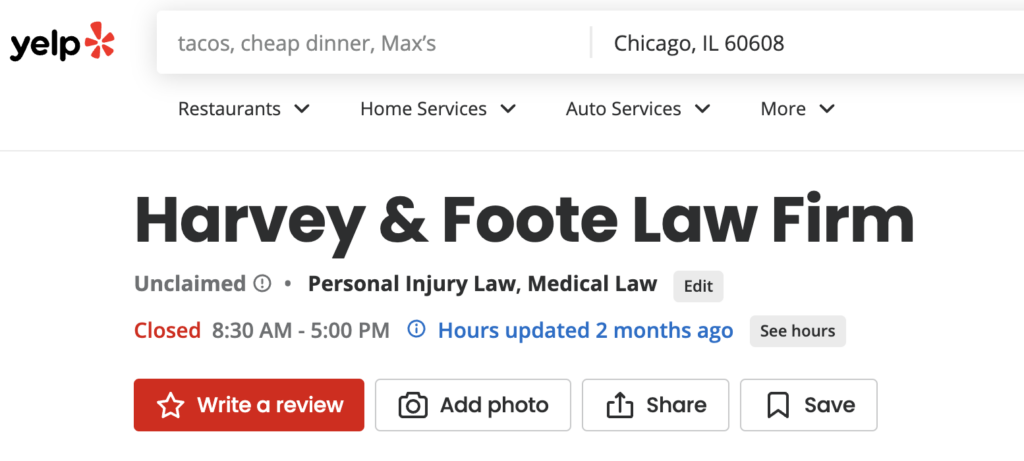
Below is an example of a Yelp law firm citation unclaimed by the firm owner. Claiming ownership helps you update critical details about your firm. It also allows you to directly manage your profile. Look up your own law firm on various directories and follow the instructions to claim it.

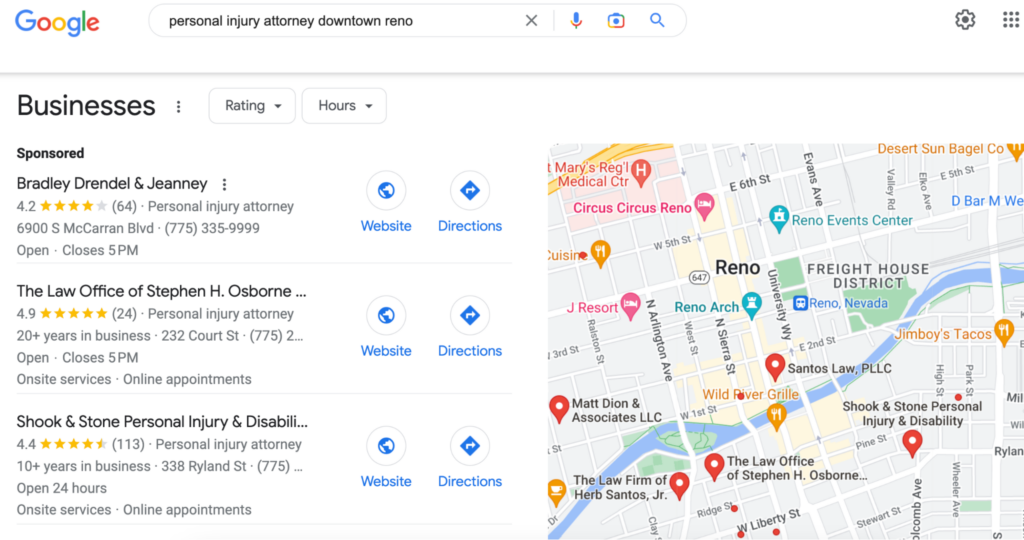
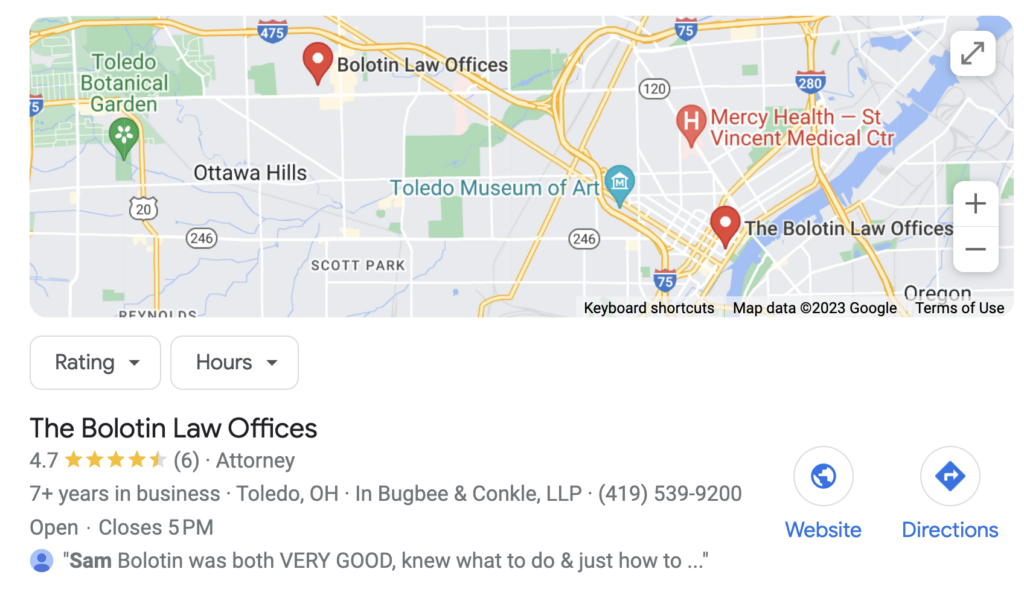
A Google Business Profile is more than an opportunity to gather reviews for your firm. It also lets you keep information like hours, phone numbers, and addresses updated. In the above Google Maps screenshot, a viewer can see the firm’s location.

Here are some of the most common directories for local citations:

  • Google Business Profile
  • Yelp
  • Avvo
  • Angie’s List
  • AttorneyPages.com
  • AP Lawyers

Some directories may not be worth it for you. They may be low quality or irrelevant to law firms.

You can vet them yourself by seeing if other lawyers are listed there. Use our list above to focus on the best local citations for lawyers. You can also check out our guide to lawyer directories to cut out the vetting process.

Are Citations a Ranking Factor for Local SEO?

Local citations are almost certainly a ranking factor for search engines. They may not all provide you with a backlink, but they give Google crucial context.

Some citation listings are very simple. You might only need to add your law firm name, office address, and phone number. Others allow for more details, and you should take advantage of these as much as possible.

Your local search rankings may benefit from accurate details in these citations.

Each time Google finds your law firm cited across the web, it verifies the data against what it already knows about your firm. When the data is clear and consistent, this adds a vote of confidence and credibility to your law firm.

Citation factors like consistency, quantity, and completeness may all help your law firm. To determine local SEO rankings, Google looks for relevance, prominence, and distance.

Having more citations in the right places could help with each of these factors.

The more Google sees you in relevant places, the more relevant and prominent it may consider you. Your address in citations may also assist Google in serving good results. It can use the address to find the distance of your firm from the potential client doing a local search.

Inconsistency, on the other hand, has the opposite effect. It sends confusing messages to Google about your firm. As a result, Google has a harder time telling if it makes sense to include your law firm in local search results.

As a final note, these local citations are most helpful with local searches. They help Google determine the rankings when someone searches for very targeted keywords.

For example, a keyword like South Side Chicago injury lawyer has local intent. If a potential client searches for a broad term like Can I sue after a bike injury citations are less helpful.

How Can You Build Citations for Your Law Firm?

You can build citations manually, with the help of services, or hands-off with an SEO partner. Building citations manually is very time-consuming. It also leaves room for data entry errors along the way.

Using a self-serve option like Moz removes some of the manual labor. It still requires input from you to get started to maintain these profiles.

Working with a law firm SEO expert is the most effective route to consistent citations. You’ll also get other important aspects of local SEO handled for you at the same time. This allows you to focus on what’s most important: serving clients.

Your local citations will, along with other SEO marketing plans, bring new clients to you.

Avoiding the Biggest Local Citation Mistakes

Seemingly minor mistakes with local citations for lawyers can have big impacts.

Inconsistent name, address, and phone number details confuse crawlers like Google. This occurs when setting up a new location or changing your phone number.

Each time you change any of these details, add updating your local citations to your to-do list.

Another common mistake is ignoring niche directories. Legal directories help to supplement your online presence and only take a few minutes to claim and update.

While the big directories like Yelp and Avvo are obvious ones to pursue, don’t stop there. There are plenty of small, niche attorney directories.

The third mistake is not monitoring your citations. Other people may be able to update your citation on certain sites. When other people make changes, it can lead to outdated or incorrect information.

The solution here is to have a system for staying on top of your citation data. This is a challenge if you decide to handle things manually. If you use a service, it’s easier. If you have a marketing partner, it’s no problem at all. 

Hand Off Local Citation Listings to a Pro

It doesn’t make sense for you to put in the time and energy to claim every local and niche citation for your law firm. They’re beneficial for local SEO for lawyers but aren’t worth you personally adding and updating them.

Work with a qualified SEO partner who can manage citations for you. It’s a hands-off process, and you can get more out of it. Citations are just the beginning of an effective campaign. A law firm SEO expert can take your campaign to the next level.

If you’re interested in taking the SEO work off your plate, contact Rankings.io. We can make sure your citations are up to date and help you with much more.

The post Top Local Citations for Lawyers in 2023 appeared first on Rankings.

Direct Mail Marketing for Attorneys: Tips for Success

Choosing the right mix of marketing channels and tactics is vital for success as a lawyer. Among the tactics to choose from is direct mail marketing.

Direct mail is one of the oldest marketing opportunities available to lawyers. It can still work in certain markets, but it’s best used as a supplement to other law firm marketing efforts.


If you want to get the best ROI for your direct mail campaign, follow these tips.

Does Direct Mail Marketing Work for Attorneys?

In some cases, direct mail can work for lawyers. As with all aspects of a traditional or digital marketing campaign, it depends on your targeting and messaging.

The only way to make an impact with direct mail is to design a piece that stands out. Up to 44% of direct mail is thrown away unopened.

To combat this, you need something that stands out. For example, a professionally designed postcard with bright colors and clear messaging.

Direct mail can be good if you’re looking to reach a hyperlocal market. It can also be useful when you work from a list of people who you know are likely to have a legal problem you can help with.

For example, injury lawyers could create a list of people who filed car accident reports recently. A criminal lawyer could generate data from everyone charged with a DUI.

Direct mail with a targeted campaign has upsides, but reporting is still a challenge.

You’ll need to take some advanced steps if you want to accurately track your results. This includes tactics like using a specific phone number, offer, or landing page to make sure you know how new clients found you.

Tips for Direct Mail Marketing

There are a few things that you can do to improve the performance of your direct mail campaigns. By following these tips, you may see positive results from your efforts.

1. Understand the Bar Association’s Rules on Sending Mail

Some bar associations do not allow attorneys to send direct mail or restrict mailers. There may also be specific rules about what you can say in direct mail.

If you’re investing time and money into a direct mail campaign, you need to know that you’re not running afoul of any specific rules. One way to start is by refamiliarizing yourself with your bar association’s lawyer advertising rules.

A general rule of thumb is to avoid unclear or misleading phrases and claims. This is as true of direct mail as it is for any of your other marketing materials.

Limitations may apply based on the people you target with your mailers. For example, Oregon, Washington, D.C., and Washington prohibit any solicitation directed to a person of diminished capacity.

Similarly, New Jersey doesn’t allow direct contact with clients about certain events unless that event is a mass disaster. In those cases, lawyers must abide by a 30-day waiting period before making contact.

2. Generate or Purchase Your Mailing List

There are many places where you can buy lists to use in direct mail marketing for attorneys. Narrow down your list of addresses by looking at demographics for your potential clients, such as neighborhoods, age, or people who own homes.

You can source your mailing list from many different places online. The important part is making sure any company you choose has good reviews.

Your mailer will only be effective if you send a good message to the right group of people. In this case, both quality and quantity are important.

3. Decide On Your Format

The majority of lawyers investing in direct mail advertising use postcards or letters, but these are not your only options. A brochure is a great way to get your name out there as a new law firm, for example. You can build a brochure with the help of a graphic designer or using an online template.

In a brochure, you should include information like:

  • The law firm and/or lawyer’s history
  • Covered practice areas
  • Office locations and contact details
  • Your unique value proposition

Postcards are popular because they reduce the risk of someone throwing away an envelope unopened. If you can get a recipient’s attention with a strong postcard, you may get a return on investment as high as 29%.

Postcards work best for communicating short messages. Use an appealing image and an expanded call to action to get the best outcome on a postcard direct mail campaign.

This postcard is clean and simple, focusing on the image and the main marketing message. For an estate planning lawyer with a targeted campaign to people above age 65, this might work well.

A brochure provides more detail than you can cover in a postcard but should still space out the text for readability purposes.

A letter can give more depth into who you are and who you want to help. They’re best used when you’re reaching out to a group of people that you know have a specific legal problem.

The example above involves people accused of reckless driving. It’s highly targeted, and the letter gets across the lawyers’ knowledge of this issue well.

4. Make it Clear and Easy to Read

Work with a professional to design any direct mail materials. Choose an easy-to-read font and concise messaging that still shows how you help people with their legal issues.

Every piece of direct mail should also conclude with a call to action, such as:

  • Making a phone call
  • Filling out a form
  • Signing up for an event

Look over your direct mail piece objectively when you get a first draft. Does it look too busy? Are the colors bold and connected to your branding? Would you throw this item away or flip it over to learn more?

5. Choose How You’ll Send Your Campaign Material

There are two major options for sending your campaign material: USPS Every Door Direct Mail or third-party mailers. Both have their pros and cons.

Every Door Direct Mail is more location-based than what a third-party mailer provides. If you need to hit certain zip codes or neighborhoods, this is the better route to go with.

With a third-party direct mail service, you can narrow your mail down for specific groups of people.

For example, you could target people who have a debtor claim filed against them in county court. Another example would be finding anyone who received a speeding ticket in the past 90 days.

6. Track Responses and Results

Determining whether your campaign got good results is the biggest hurdle with direct mail. Without tracking, it’s hard to tell if a potential client found you through the mailer or some other means.

Because of this challenge, it can be tough to know if the money you put in justifies the volume of responses you get.

The best way to work around this problem is by placing some kind of tracking on the mailer itself. There are a few ways to add tracking on your direct mail advertisement, such as:

  • Using a separate toll-free number
  • Directing people to a specific contact-gathering landing page
  • Adding QR codes on the mailer that direct to a unique landing page on your site

This way, you can get a realistic sense of how many people saw your direct mail and took action after receiving it.

Alternatives to Direct Mail

Direct mail is best as a supplement to ongoing marketing efforts. As part of a broader attorney marketing plan, it can supplement your results. It can even help you grow your numbers with specific case types.

But a direct mail marketing campaign should not be your only way of bringing in new business.

Law firm content marketing through online channels may get you better results. With online marketing, you can reach more people, and better target them.

You can also take advantage of inbound marketing to educate prospective clients. That way, they come to you already familiar with your firm and legal services.

You’re unlikely to be able to use direct mail all the time. You can’t send a mailer every single day, for instance.

But you can always build on your law firm SEO, social media, and PPC efforts. You can post every day on social media, sending messages directly to your target audience. You can cash in on people’s 24-hour search habits by creating SEO content or PPC ads.

You can also get better feedback on your performance through detailed analytics tools. With online marketing, you can watch your reach and rankings grow in real-time.

Deciding if Direct Mail Will Work for You

Direct mail may not make sense for your law firm if you already see good results through your other efforts.

If things like law firm SEO and attorney PPC are paying off for you, you may not need to spend the time or money on a direct mail campaign.

Direct mail is best used as an occasional supplement.

For example, if you have a specific event coming up, direct mail may make sense. Similarly, if you need to reach a group of people in your local area, direct mail can boost your business.

If you’d prefer something more consistent, you may want to consider digital marketing. Inbound marketing can provide compounding results at a steady pace. Direct mail can’t say the same thing.

To learn more, you can check out our guides to law firm marketing, search engine optimization, social media marketing, and more.

The post Direct Mail Marketing for Attorneys: Tips for Success appeared first on Rankings.